Chalkie: A Quirky Display Font with Versatile Appeal
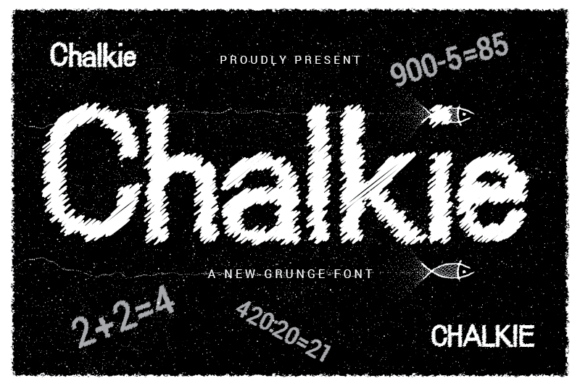
Chalkie is a display font that stands out for its playful, hand-drawn style. Designed to mimic the look of chalk writing on a blackboard, it brings a sense of nostalgia and creativity to any project. Whether you're designing a logo, creating social media content, or crafting a presentation, Chalkie adds a unique visual flair that can capture attention and convey personality.
Why People Love Using Chalkie
Chalkie's charm lies in its simplicity and versatility. It works well for headings, banners, and short phrases where a more whimsical or educational tone is desired. Its clean lines and soft curves give it an approachable feel, making it ideal for branding that wants to appear friendly and engaging.
Designers often choose Chalkie for projects related to education, children's products, creative workshops, or anything that benefits from a touch of spontaneity. Its legibility is surprisingly good for a display font, which makes it suitable for use in both digital and print formats.
Common Mistakes When Using Chalkie
While Chalkie is a great choice, there are some common pitfalls that can affect the overall design and readability of your work.
Mistake 1: Overusing Chalkie
Using Chalkie for every text element can be overwhelming and reduce its impact. It's best reserved for headlines or call-to-action buttons rather than body text. Overuse can make your design look cluttered and unprofessional.
Better Approach: Use Chalkie sparingly. Pair it with a more traditional sans-serif or serif font for body text to maintain balance and clarity.
Mistake 2: Ignoring Font Pairing
Not considering how Chalkie interacts with other fonts can lead to poor typographic harmony. A mismatched font pair might confuse the reader or make the message less clear.
Better Approach: Experiment with complementary fonts. For example, pairing Chalkie with a modern sans-serif like Helvetica or Arial can create a nice contrast between casual and professional styles.
Mistake 3: Not Checking Readability
Even though Chalkie is designed to be readable, certain characters may not render as clearly on different screens or in various sizes. This can be especially problematic when using it for smaller text or in low-resolution environments.
Better Approach: Always test your designs at different sizes and on various devices. Ensure that the key messages remain legible and that the font doesn't compromise the overall user experience.
What to Check Before Choosing Chalkie
Before deciding to use Chalkie in your project, consider these factors to ensure it aligns with your goals and audience expectations.
- Purpose of the Design: Is Chalkie appropriate for your brand voice and message? If you're targeting a younger audience or want to communicate a fun and informal vibe, it could be perfect.
- Legibility Requirements: Will the text be read from a distance or on small screens? If so, ensure that Chalkie remains clear and easy to understand in those contexts.
- License and Usage Rights: Make sure you have the correct license for the font you're using. Some fonts require attribution or have restrictions on commercial use.
- Compatibility: Check if Chalkie works well across different platforms and browsers. Some fonts may not render correctly on all systems unless embedded properly.
Practical Tips for Using Chalkie Effectively
To get the most out of Chalkie, follow these practical tips that will help you avoid common issues and enhance your design outcomes.
Tip 1: Keep Text Short. Since Chalkie is a display font, it works best with shorter phrases. Long paragraphs may become difficult to read and lose their visual appeal.
Tip 2: Use Color Wisely. The color of the text can significantly influence how Chalkie is perceived. Light colors on dark backgrounds or vice versa can enhance the chalk-like effect and improve visibility.
Tip 3: Add Visual Context. Consider adding subtle background textures or effects that mimic a chalkboard. This can reinforce the theme and make the font feel more intentional and cohesive.
Tip 4: Test Across Devices. Always preview your design on multiple devices and screen sizes. What looks great on a desktop may not translate well to a mobile phone or tablet.
Final Thoughts on Chalkie
Chalkie is a versatile and expressive font that can elevate your designs with its unique character. However, like any tool, it requires thoughtful application to achieve the best results. By understanding its strengths and limitations, you can use it effectively without falling into common traps.
Whether you're a designer, marketer, educator, or entrepreneur, Chalkie offers a creative way to stand out and connect with your audience. With the right approach, it can become a valuable addition to your typography toolkit.